Lay Flat Clothing Photography on a Bedsheet: A Phone-Only Flat Lay Formula That Still Looks Premium
A prop-free flat lay recipe: three layouts, one accent item, side window light and a batch workflow that keeps your whole grid consistent — shot on a phone, on a bedsheet.
In this article
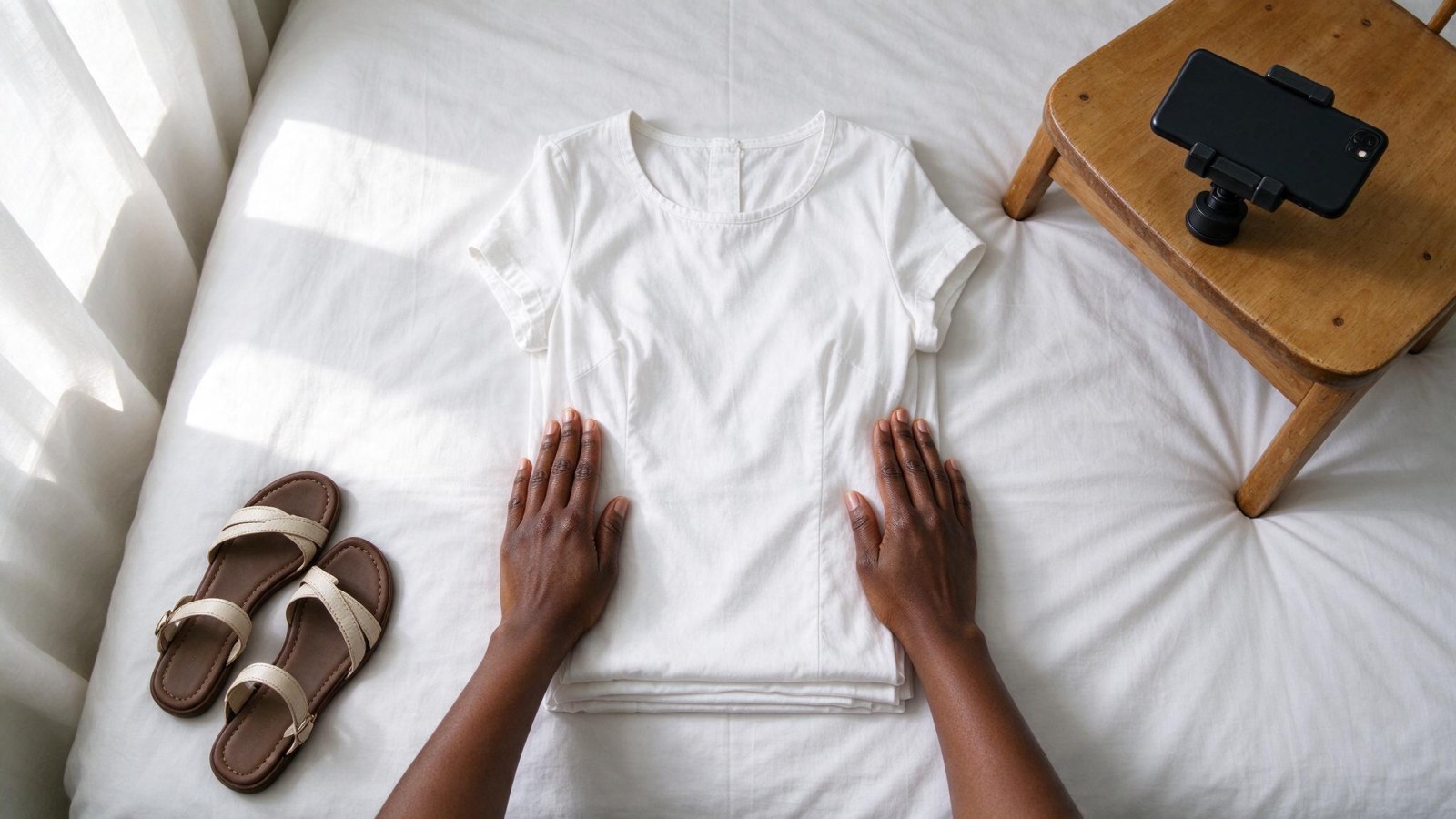
Lay flat clothing photography is simple: you arrange the garment on a flat surface, put the phone directly above it and shoot straight down. No model, no studio, no second pair of hands. A bedsheet, a window and a chair are enough. What separates a flat lay that looks like laundry from one that looks like a brand is five small habits: ironing properly, taping the background tight, keeping the phone level, using side light instead of overhead sun, and placing one accent item with intent.
This is a repeatable recipe you can run with stock already in your shop, then repeat for every drop.
What a flat lay actually is, and when it beats an on-body shot
A flat lay is clothes arranged on a flat surface, photographed from directly above with the camera lens parallel to that surface. Nothing else. The moment the phone tilts, the garment squashes and the whole thing looks wrong.
It suits a small seller because it needs one person, one phone and about ten minutes per piece. You can shoot a week of grid posts in an afternoon, and nothing about the setup depends on finding a model who shows up on time.
Flat lays are good for:
- Showing a full outfit as one look — top, bottom, shoes together
- Fabric pattern, print and texture, which buyers cannot judge from a hanger shot
- Colour ranges and size runs, because five pieces of the same style in five colours read clearly in a row
- Capsule collections and drop announcements
- Price-point pieces where the buyer wants to see exactly what arrives
Flat lays are bad for:
- Showing fit — how a dress sits at the waist, how a shirt falls at the shoulder
- Showing drape and length on a real body
- Anything a buyer needs to see moving, like a slit, a wrap or a stretch fabric
So use flat lays for the grid, the catalogue and the drop, and keep at least one on-body or on-model image per product for the buyer who needs to see fit. If you sell wigs, skincare or jewellery, the same flat lay logic applies to the styling shot — just swap the garment for the product and keep the rules.
The kit you already have (and the one thing worth buying)
You need less than you think:
- Your phone, rear camera, lens wiped clean
- A chair or stool to mount the phone above the layout
- An ironed bedsheet or a plain length of cloth, bigger than the area you plan to shoot
- A window with daylight coming through it
- A white cloth or a sheet of white paper to bounce light back into the shadows
- Masking tape to pull the background tight
If you buy one thing, buy a cheap phone clamp or a small flexible holder that grips the chair back. It removes the wobble and lets you shoot hands-free, which matters when you are smoothing fabric and shooting at the same time.
The mounting trick
Put a chair on a table, or use a step stool, so the phone sits comfortably above the layout — roughly chest height above the fabric is a good starting point. Lay the phone flat, screen facing up, lens pointing straight down at the clothes. Check the level with the grid lines in your camera app, or rest the phone on a book edge to keep it flat.
The two setup killers:
- The phone's own shadow. If your body or the phone is between the window and the clothes, you get a dark band across the garment. Move the setup, not the light.
- A tilted camera. Even a slight tilt makes a dress look short and wide. If the frame looks like a trapezoid instead of a rectangle, the phone is not level.
Then lock focus and exposure by tapping and holding on the garment, and switch the flash off. Flash flattens texture and creates a hard hotspot.
Shoot one frame slightly loose — a little extra cloth around the edges — so you can crop it tall for the feed and square for WhatsApp catalogue thumbnails without losing the hem or the sleeves.
Prep the clothes and the background before you place anything
This stage decides whether the photo reads as premium or as a bedsheet.
Before anything goes down:
- Steam or iron every piece. Creases and a curling hem are the single biggest giveaway of a home setup.
- Remove tags and price stickers.
- Pick off lint with tape.
- Stuff shoes with socks or rolled paper so they hold their shape.
- Straighten straps, belts and necklaces so nothing is twisted.
Then fix the background:
- Pull the sheet tight and tape the corners underneath so there are no ripples.
- Choose a colour that contrasts the garment — a light sheet for dark clothes, a darker cloth for white and cream.
- Avoid patterned bedding entirely. Prints compete with the product.
- Keep the background bigger than your frame so no floor, table edge or wall creeps into the shot.
Three flat lay layouts you can build from stock you already have
Layout 1 — the single hero piece
One garment, centred or deliberately off-centre with empty space on one side. Curve the sleeves softly rather than laying them out in stiff symmetry. A perfectly symmetrical shirt looks like a catalogue from 2009; a slight curve looks styled.
Layout 2 — the outfit pairing
Top and bottom, or a dress with a shoe. Place them so they read as one look, with a small gap between pieces so the edges do not merge into a blob. Add one accent item only: a shoe, a bag, a pair of earrings, a sprig of leaves from outside. One. Two accents start to look like clutter.
Layout 3 — the capsule row
Three to five pieces of the same category, spaced evenly, all at the same angle and the same distance apart. This is the layout that makes a grid or carousel look like a proper collection drop, and it is the easiest to keep consistent across a batch.
Rules that hold across all three:
- Keep pieces square to the frame, or all at one consistent angle. Never mix angles in the same shot.
- Leave breathing space at the edges — do not let a sleeve touch the frame.
- Put the accent item where it supports the story, not wherever there is a gap.
- Shoot three or four variations of each layout instead of one. To change the shot, move the accent, not the garment.
Fix the light with a window and a white cloth
Light is where most phone flat lays fail, and it costs nothing to fix.
- Use side window light, not overhead midday sun. Position the layout so light falls across the fabric from one side. That is what shows texture — the weave of cotton, the sheen of satin, the grain of leather.
- Bounce the shadows. Hold a white cloth or a sheet of white paper on the side opposite the window. It fills the dark side without adding a second light source. A plain white bedsheet on the floor does the same job.
- Turn the room light off. Mixing daylight with a yellow bulb gives you two colour temperatures in one photo, and no edit fully fixes it.
- Shoot when the light is soft — morning, late afternoon, or a cloudy day. Harsh noon sun makes hard shadows that look cheap.
- Keep the same spot and the same time for the whole batch so every photo matches.
Before you move on from a layout, look at the photo at full size on the phone. Check for shadows across the garment, creases you missed, and stray lint. Fixing it now takes seconds; fixing it later means reshooting.
Shoot a whole collection in one sitting without the grid looking messy
Batching is the difference between a seller who posts consistently and one who posts when there is time.
- Build a shot list on paper first. For each item: the layout type, the accent, and which channel it is for. Ten lines is enough.
- Prep everything at once. Iron six to ten pieces before you start, and keep them on a rail or a hanger beside the setup so you are not ironing between shots.
- Keep the constants fixed. Same spot, same phone height, same background, same distance, same crop and same colour edit. Change only the clothes.
- Shoot in one session, in one light. If you shoot half the collection in the morning and half at dusk, the grid will flicker between warm and cool images and look like two different shops.
- Name and file as you go. Item, colour, layout. Posting later becomes a five-minute job instead of an evening of scrolling.
From bedsheet to studio: editing on the phone, then handing it over
The safe phone edits are the boring ones: straighten, crop to one ratio, lift the exposure slightly, clean up dust spots, and keep the colour true to the real product. If a buyer orders a cream dress and receives something that looked white online, you have bought yourself a return.
Then there is the limit. A phone flat lay on a bedsheet still has bedsheet texture, a slightly grey background and a shadow you could not fully bounce out. Next to a competitor's studio shot, it reads as a home setup — even when the product is better.
This is where WonderClips fits. Upload the finished flat lay and generate a clean studio version of the same shot, or a lifestyle scene, without reshooting the product. A standard photo costs 1 credit and a studio-quality photo costs 5 credits, and the free trial gives you 5 credits for 3 days with no card. You can see what a cleaned-up phone flat lay becomes on the /transformations page, and check plans and credits on /pricing.
Be realistic about the limit: the flat lay still has to be sharp, well lit and the true colour. A blurred photo of the wrong item cannot be rescued by any tool.
Your next step
Run the five-point check before every shot: ironed, background taped, phone level, side window light, one accent item.
Then do this today. Pick three pieces already in your shop and recreate the three layouts above — the hero piece, the outfit pairing and the capsule row. Shoot a few variations of each, choose the best frame, and see it as a studio image before you post it. You can create a free WonderClips account at /register and use the 5 free credits to test it on your own photo.
One last thing worth remembering: the sellers who look premium are not the ones with the best camera. They are the ones whose photos all look like they came from the same setup, week after week.
Frequently asked questions
Can I take flat lay photos with just a phone?
Yes. A phone, a chair to mount it above the layout, a window and a plain cloth are enough. The camera matters far less than the ironing, the level phone and the side light.
What should I use as a background for a clothing flat lay?
An ironed bedsheet or a plain length of cloth, pulled tight and taped underneath. Pick a colour that contrasts the garment and avoid prints, because patterns compete with the product.
How do I get the camera directly above the clothes without a tripod?
Put a chair on a table or use a step stool. Lay the phone flat with the lens pointing straight down and check the grid lines in your camera app to confirm it is level. A cheap phone clamp removes the wobble.
How many items should go in one flat lay?
One for a hero shot, two for an outfit pairing, and three to five for a capsule row. Add one accent item at most — a shoe, a bag, a piece of jewellery or a sprig of leaves.
How do I stop shadows ruining my flat lay?
Keep your body and the phone out of the line between the window and the clothes, and bounce light back in with a white cloth or sheet of paper held on the opposite side. Turn the room light off so you are working with one light source.